In This Guide
- What Is a Google Knowledge Panel?
- Why Event Planners Need a Knowledge Panel
- How Google Decides Who Gets a Panel
- Build Your Entity Profile
- Create Your Wikidata Entry
- Earn Press That Triggers Panels
- Add Structured Data to Your Website
- Claim and Verify Your Panel
- Check Your Knowledge Graph Status
- Frequently Asked Questions
1. What Is a Google Knowledge Panel?
A Google Knowledge Panel is the information box that appears on the right side of desktop search results (or at the top on mobile) for recognized people, businesses, and organizations. It pulls data from across the web to display your photo, credentials, key facts, and links to your profiles — all in a single, prominent box.
The U.S. event planning market exceeds $5 billion annually with over 130,000 event planners. The post-pandemic return of in-person events has created a supply squeeze, with experienced planners commanding premium rates.
A Knowledge Panel positions an event planner as a recognized event production authority, displaying portfolio events, industry awards, and professional certifications — the verified credibility that attracts premium corporate and social event clients.
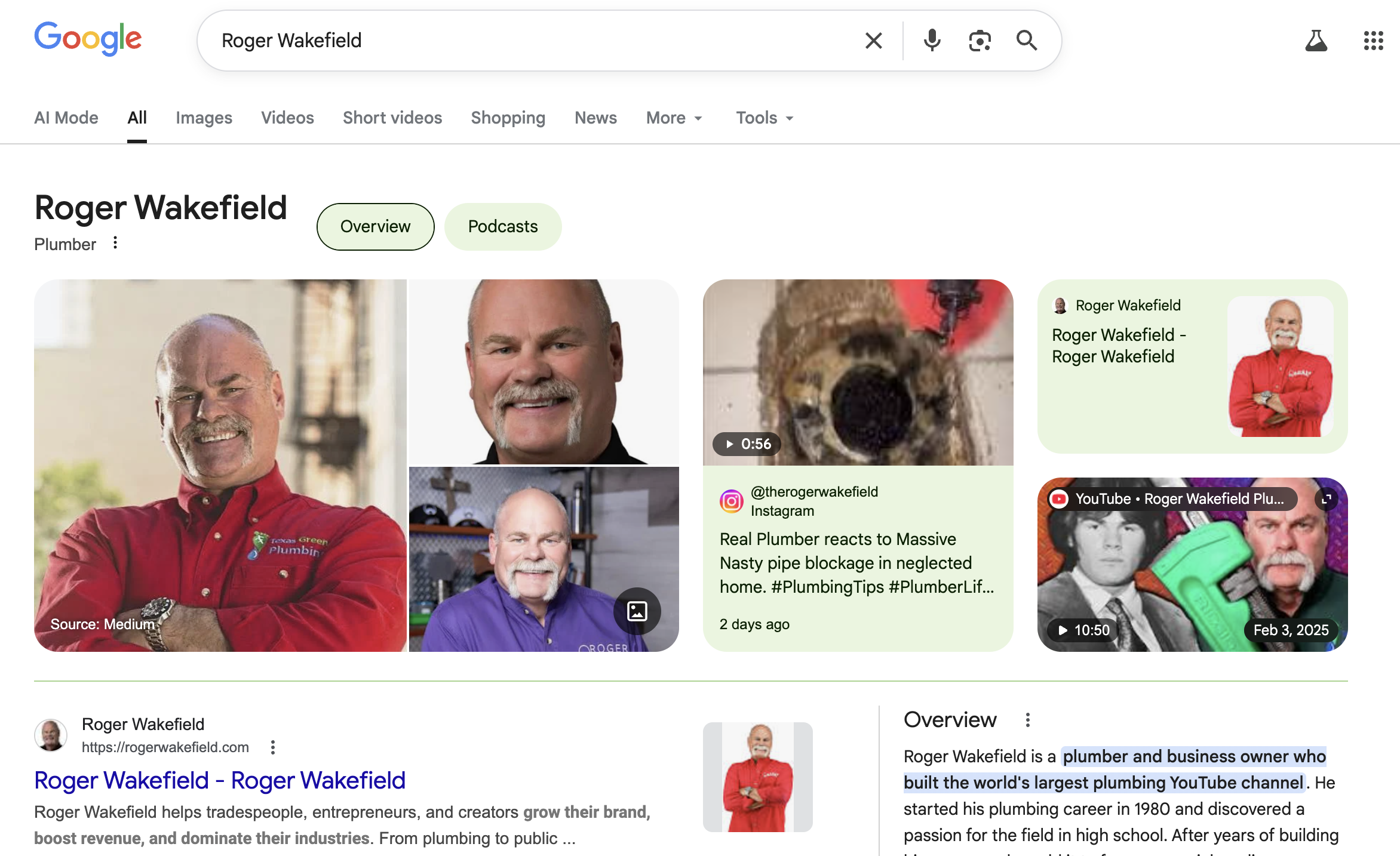
Knowledge Panels are not ads. You cannot buy one. They are algorithmically generated based on Google's confidence that you are a recognized, notable entity. That is why they carry weight — corporations planning events, engaged couples planning weddings, and organizations hosting conferences and galas treat them as a signal that Google itself recognizes you as an authority.
2. Why Event Planners Need a Knowledge Panel
When corporations planning events, engaged couples planning weddings, and organizations hosting conferences and galas search for a event planner by name, the Knowledge Panel is the first thing they see on the right side of search results. It communicates three things instantly: this person is real, this person is established, and Google recognizes this person as notable.
That visual is worth more than a hundred-dollar-a-day ad campaign. It operates 24 hours a day, costs nothing to maintain once earned, and positions you above every competitor who does not have one.
The practical benefits for event planners:
- Instant credibility. A Knowledge Panel signals to corporations planning events, engaged couples planning weddings, and organizations hosting conferences and galas that you are a verified, recognized professional — before they read a single word on your website.
- Search real estate. Your panel occupies a massive portion of the search results page, pushing competitor content below the fold.
- Trust at the point of decision. corporations planning events, engaged couples planning weddings, and organizations hosting conferences and galas who see a Knowledge Panel are more likely to click through to your site, book an appointment, or make contact.
- Competitive separation. Most event planners do not have a Knowledge Panel. Having one immediately distinguishes you from every other event planner in your market.
A Knowledge Panel is Google's way of saying: "We've verified this person exists, we know who they are, and we've gathered enough information to present them as a recognized entity." For event planners, that third-party validation closes deals that your website alone cannot.
3. How Google Decides Who Gets a Panel
Google's Knowledge Graph is a database of entities — people, places, businesses, concepts — that Google has confirmed through multiple independent sources. A Knowledge Panel appears when Google has high enough confidence in your entity data to display it publicly.
Four signals drive that confidence:
Entity consistency. Your name, title, and credentials must match across multiple authoritative sources. Google cross-references everything. If your LinkedIn says "Dr. Smith, Cardiologist" but your website says "John Smith, Heart Doctor," you are creating confusion, not clarity.
Notability signals. Published articles about you in news outlets, industry publications, and recognized media sources tell Google that other sources have independently identified you as notable. For event planners, articles in BizBash, Special Events Magazine carry significant weight.
Structured data. Schema markup on your website gives Google machine-readable information about who you are. Person schema, Organization schema, and sameAs properties connect your web presence into a coherent entity.
Knowledge base entries. Wikidata and Wikipedia entries feed directly into Google's Knowledge Graph. A Wikidata entry is not a guarantee of a panel, but it significantly increases your chances.
No single signal triggers a Knowledge Panel. It is the combination of consistent entity data, press coverage, structured data, and knowledge base entries that crosses Google's confidence threshold. Missing any one of these weakens the overall signal.
4. Build Your Entity Profile
Entity building is the foundation of every Knowledge Panel strategy. Before you think about Wikidata or press coverage, you need to make sure your identity is consistent and verifiable across the web.
1 Lock in your canonical name
Pick the exact name you want Google to associate with your entity. Use it everywhere. Your website, your LinkedIn, your Google Business Profile, your publications, your press mentions. If your name is "Dr. Sarah Chen" then every platform should say "Dr. Sarah Chen" — not "Sarah Chen, MD" on one and "S. Chen" on another.
2 Create or update all professional profiles
Google cross-references professional directories and social platforms. For event planners, this means claiming profiles on relevant platforms: LinkedIn, Google Business Profile, and industry-specific directories. Each profile should use your canonical name, the same professional headshot, and consistent credentials.
3 Connect everything with sameAs
On your website, your Person or Organization schema should include sameAs links pointing to every official profile: LinkedIn, Twitter/X, your Google Business Profile URL, your professional directory listings. This tells Google: "All of these are the same entity."
4 Build authority data assets
Create profiles on knowledge bases and authority platforms that Google trusts: Crunchbase (if you run a business), IMDB (if you have any media credits), Pinterest (for image signals), and other platforms relevant to event planners. Each one adds another verifiable signal to your entity profile.
5. Create Your Wikidata Entry
Wikidata is the structured data project that feeds directly into Google's Knowledge Graph. It is different from Wikipedia — Wikidata has lower notability requirements and is designed for machine-readable data, not prose articles.
Creating a Wikidata entry involves adding a structured item with your name, description, occupation, and key identifiers. It requires supporting references: published articles, official profiles, or other verifiable sources that confirm your identity and occupation.
For event planners, a Wikidata entry typically includes: your full name, occupation (e.g., "Event Planner"), any relevant credentials or certifications, and links to your official website and professional profiles.
Wikidata requires references. Before creating your entry, make sure you have at least 2-3 published articles or official sources that independently verify who you are and what you do. Directory listings and press coverage from earlier steps serve as these references.
6. Earn Press That Triggers Panels
Published press coverage is the notability signal that often tips Google's confidence over the threshold. For event planners, press does not mean national headlines — it means published articles on news sites that Google indexes and trusts.
The most effective press strategy for Knowledge Panel seekers:
Industry publications. Contributed articles in BizBash, Special Events Magazine and similar outlets. These carry authority weight because they are peer-recognized sources in your field.
Google News-indexed sites. Articles published on sites that appear in Google News carry additional weight for entity recognition. These do not need to be major publications — regional news sites and industry news platforms count.
Multiple independent sources. Google looks for independent corroboration. Three articles from three different publications are more powerful than ten articles from a single source. Spread your press coverage across multiple outlets.
Need Help Getting Published?
We place event planners in Google News-indexed publications to build the authority signals that trigger Knowledge Panels. No experience writing articles needed.
Learn About Our Press Placement Service7. Add Structured Data to Your Website
Structured data is code you add to your website that gives Google machine-readable information about who you are. It does not change how your site looks to visitors — it is invisible markup that helps Google's crawlers understand your entity.
The two essential schema types for event planners seeking a Knowledge Panel:
Person schema. Describes you as an individual: your name, job title, employer, education, credentials, and links to your profiles. This is the most important schema for personal Knowledge Panels.
Organization schema. Describes your business or practice: name, address, contact info, founding date, and social profiles. Even if you want a personal panel, Organization schema helps Google understand the entity ecosystem around you.
Both schema types should include sameAs properties linking to your LinkedIn, social profiles, Wikidata entry, and any other official pages. This tells Google's Knowledge Graph that all of these sources describe the same entity.
8. Claim and Verify Your Panel
Once your Knowledge Panel appears in search results, you can claim it through Google's verification process. Claiming gives you the ability to suggest edits, update information, and flag inaccuracies.
To claim your panel, search your name on Google, find the Knowledge Panel, and click "Claim this Knowledge Panel" at the bottom. Google will verify your identity through one of several methods: a linked social profile, a phone call, or an official website verification.
After verification, you can suggest changes to the panel's content. Google reviews suggestions and typically updates within days to weeks. You cannot control every element — Google reserves the right to display information it deems accurate — but you can correct errors and update key facts.
Check If Google Already Recognizes You
Many event planners have Knowledge Graph data before a visible panel appears. Our free tool searches Google's Knowledge Graph API to show you where you stand.
Check Your Knowledge Graph Status →Frequently Asked Questions
How does a Google Knowledge Panel help event planners?
The timeline varies based on your existing online presence. Event Planners with published articles and consistent entity data can see a panel in 3 to 6 months. Starting from scratch, expect 6 to 12 months of deliberate entity building.
What information appears in an event planner's Knowledge Panel?
No. Google does not sell Knowledge Panels. They are generated algorithmically based on entity data, notability signals, and structured data across the web. Anyone claiming to sell a Knowledge Panel directly is misleading you.
How long does it take for an event planner to get a Knowledge Panel?
Once you claim your Knowledge Panel through Google's verification process, you can suggest edits to correct inaccurate information. Google reviews your suggestions and typically updates the panel within a few days to weeks.
Do event planners need a Wikipedia page to get a Knowledge Panel?
No. A Wikipedia article helps, but a Wikidata entry (which has lower notability requirements) combined with published press coverage and structured data on your website is often sufficient. Many event planners have Knowledge Panels without Wikipedia pages.
See What Google Says About You
Get a free, personalized audit of your online presence — see exactly what shows up when people Google your name.
Get Your Free Google Audit